ImagePixel guide
Minecraft Wool vs. Concrete Colors for Pixel Art
Wool and concrete are the two most common block families for flat pixel art in Minecraft because each comes in the same 16 dye colors and is easy to get in bulk. They are not interchangeable, though: the colors differ enough that the same picture comes out noticeably different, and the material totals change too. This page compares the two sets side by side using real conversions and block counts.
Updated October 9, 2026. Every example image on this page was produced by the current ImagePixel converter code with the settings shown in its caption.
The short answer
- Concrete has flat, solid faces and stronger, more saturated colors. It reads cleanly from a distance and is the usual choice for large wall or floor art.
- Wool has a visible woven texture and slightly softer colors. It can look better up close and is available very early in a survival world, but it is flammable.
- Both sets share the same 16 color names, so a plan made with one can be rebuilt in the other, but expect different counts per color, as the tables below show.
Concrete was added in Java Edition 1.12 in 2017. Exact appearance still varies with the game version, resource pack, shaders and lighting, so treat any color list, including the one below, as an approximation.
The 16 wool colors
These are the approximate sRGB values ImagePixel uses when it matches an image to wool. Each cell of the converted grid is assigned whichever of these 16 colors is nearest.
- White Wool
#E9ECEC - Orange Wool
#F07613 - Magenta Wool
#BD44B3 - Light Blue Wool
#3AAFD9 - Yellow Wool
#F8C627 - Lime Wool
#70B919 - Pink Wool
#ED8DAC - Gray Wool
#3E4447 - Light Gray Wool
#8E8E86 - Cyan Wool
#158991 - Purple Wool
#792AAC - Blue Wool
#35399D - Brown Wool
#724728 - Green Wool
#546D1B - Red Wool
#A12722 - Black Wool
#141519
The 16 concrete colors
The concrete values are generally more saturated, and several neutrals are darker. Compare Light Gray (#7D7D73 for concrete against #8E8E86 for wool) or Green, which is a darker olive in concrete.
- White Concrete
#CFD5D6 - Orange Concrete
#E06100 - Magenta Concrete
#A9309F - Light Blue Concrete
#2389C6 - Yellow Concrete
#F1AF15 - Lime Concrete
#5DAA1E - Pink Concrete
#D5658E - Gray Concrete
#36393D - Light Gray Concrete
#7D7D73 - Cyan Concrete
#157788 - Purple Concrete
#64209C - Blue Concrete
#2C2E8F - Brown Concrete
#603B1F - Green Concrete
#495B24 - Red Concrete
#8E2020 - Black Concrete
#080A0F
Same image, both palettes
Here is one illustration of a treasure chest converted at 32 columns, which makes a 32 × 24 wall of 768 blocks, first with wool and then with concrete. Dithering is off, which is what you want for anything you will place by hand.
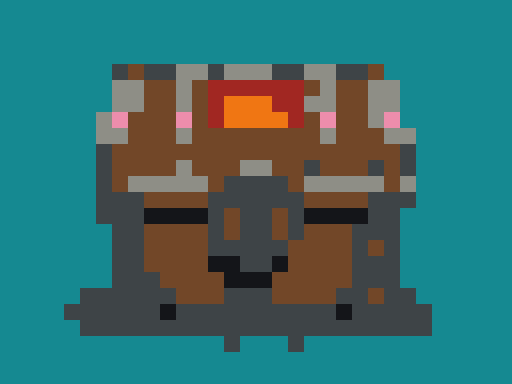
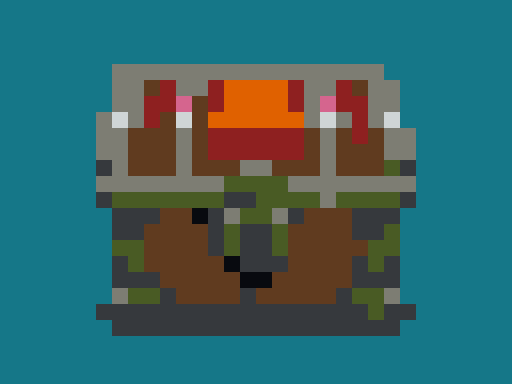
The concrete version uses two more colors, and because its grays and browns sit at different values from wool's, the split between wood and metal falls in different places. It also shows a typical side effect of nearest-color matching: 38 dark wood cells are matched to Green Concrete because that olive is numerically closer to them than Brown. If that looks wrong to you, it is a reasonable manual swap, but note it in your material list.


Landscapes show the limits of both sets: neither has several shades of blue, so a sky gradient becomes one or two flat areas. If gradients matter, a wider grid will not fix it; you would need to mix in other blocks by hand.
Block counts for the 32 × 24 chest
These are the counts from the converter's color panel for the two chest conversions above, with the stack breakdown added. Every cell is one block, so the totals always equal columns × rows.
| Block | Blocks | Stacks of 64 |
|---|---|---|
| Cyan Wool | 437 | 6 × 64 + 53 |
| Gray Wool | 129 | 2 × 64 + 1 |
| Brown Wool | 122 | 1 × 64 + 58 |
| Light Gray Wool | 42 | 42 |
| Black Wool | 16 | 16 |
| Red Wool | 11 | 11 |
| Orange Wool | 7 | 7 |
| Pink Wool | 4 | 4 |
| Total | 768 | 12 × 64 |
| Block | Blocks | Stacks of 64 |
|---|---|---|
| Cyan Concrete | 450 | 7 × 64 + 2 |
| Brown Concrete | 82 | 1 × 64 + 18 |
| Gray Concrete | 76 | 1 × 64 + 12 |
| Light Gray Concrete | 73 | 1 × 64 + 9 |
| Green Concrete | 38 | 38 |
| Red Concrete | 25 | 25 |
| Orange Concrete | 14 | 14 |
| White Concrete | 4 | 4 |
| Black Concrete | 4 | 4 |
| Pink Concrete | 2 | 2 |
| Total | 768 | 12 × 64 |
Most of each total is background. Cyan accounts for 437 of 768 wool blocks. If you are building the subject against an existing wall, convert a PNG with a transparent background instead: fully transparent cells are left empty and are not counted, so the list only contains blocks for the chest itself.
Planning tips
- Pick the width from the wall, not the image. A 64-column design needs four times as many blocks as a 32-column one.
- Use the grid PNG while building. It enlarges each cell and draws lines, so you can count across a row.
- Copy the color list from the converter into a note before you start gathering materials.
- Check in daylight. Lighting and shaders change how close two colors look in game.
The Minecraft pixel art generator opens with wool selected and grid lines included in the export. It produces a planning image and counts, not a schematic or a file you can import into the game.